Deciding between DaVinci Resolve vs. Adobe Premiere Pro shapes your daily editing pace, system requirements, and long-term production costs. Both platforms stand as industry titans, yet they approach post-production from fundamentally different angles. One evolved from an elite Hollywood color grading console into an all-in-one creative suite, while the other serves as the versatile centerpiece of Adobe’s ubiquitous design ecosystem.
Choosing the right software early saves you hundreds of hours of relearning keyboard shortcuts, project structures, and timeline paradigms. Whether you assemble fast social media cuts or grade high-end narrative cinema, understanding how these two titans compare will help you select the exact tool for your production pipeline.
DaVinci Resolve vs. Adobe Premiere Pro: Core Workflow Architecture
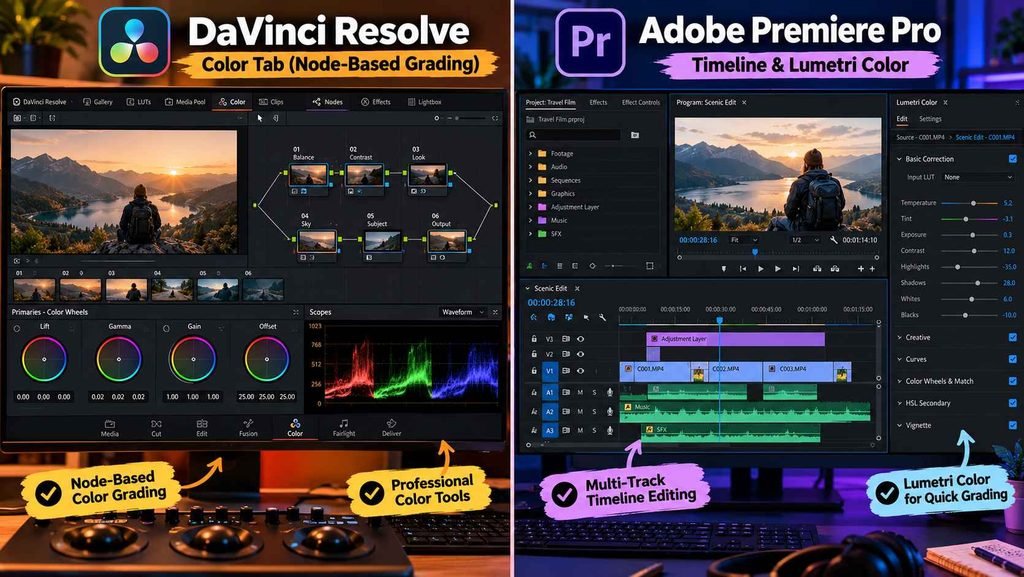
The sharpest divide between these tools lies in how they organize your post-production tasks. Adobe Premiere Pro operates on a modular, customizable layout designed around flexible panels. You can drag, dock, and float windows across multiple monitors, arranging bins, audio meters, and sequences to match your personal editing preferences.
DaVinci Resolve uses dedicated, page-based workspaces arranged chronologically: Media, Cut, Edit, Fusion, Color, Fairlight, and Deliver. Instead of opening separate software programs, you switch tabs along the bottom of your screen to tackle audio mixing or visual effects. This unified environment eliminates file transfer headaches, but it requires editors to adapt to Blackmagic’s rigid page structure.
Premiere Pro counters with unmatched round-tripping across Adobe Creative Cloud. If an edit requires kinetic title design or vector illustration, you can send assets back and forth between After Effects and Photoshop via Adobe Dynamic Link without rendering intermediate digital master files. Beginners stepping into Adobe’s ecosystem often benefit from a structured Premiere Pro masterclass for video editing to master these multi-app linking mechanics early.
Color Grading and Audio Post-Production
DaVinci Resolve remains the undisputed gold standard for digital color grading. Built on a node-based architecture, Resolve handles secondary isolations, complex tracking power windows, and custom color space transformations with surgical precision. Editors grading raw footage from cinema cameras get access to wide-gamut 32-bit floating-point processing, making recovery of clipped shadows and highlights remarkably fluid.
Premiere Pro relies on the layer-based Lumetri Color panel. Lumetri provides an approachable, slider-driven interface that mimics photo editing tools like Adobe Lightroom. While it handles basic balance adjustments, contrast curves, and creative LUT applications swiftly, pushing extreme grades or isolating subtle skin tones across tricky multi-cam sequences can feel restrictive compared to Resolve’s node graphs.
On the audio front, Resolve integrates Fairlight, a full digital audio workstation (DAW) built right into the app. Fairlight supports hundreds of audio tracks, native ADR recording, spatial audio bussing, and comprehensive dynamics processing. Premiere features powerful audio repair algorithms like Enhance Speech and the Essential Sound panel, but complex film soundscapes often force creators to export their timelines into Adobe Audition.
Pricing Models and Long-Term Ownership Costs
Subscription fatigue has made pricing one of the most decisive factors for independent filmmakers and solo creators. Adobe Premiere Pro requires an ongoing monthly or annual subscription through Adobe Creative Cloud. While this guarantees constant cloud updates, frame.io team reviews, and access to Adobe Stock assets, the recurring expense continues as long as you use the software.
Blackmagic Design disrupts the industry with a perpetual licensing model. DaVinci Resolve offers a remarkably full-featured free version with no watermarks, supporting 4K UHD export, multi-cam editing, and standard color tools. Upgrading to DaVinci Resolve Studio costs a one-time fee of $295, which includes lifetime major updates, neural engine AI tools, advanced noise reduction, and stereoscopic 3D support.
For creators testing the waters without draining their bank accounts, exploring the best Domestika video editing courses provides hands-on editing blueprints that teach visual storytelling fundamentals applicable to either software package.
DaVinci Resolve vs. Adobe Premiere Pro: Feature Comparison
| Core Feature & Metric | DaVinci Resolve Studio | Adobe Premiere Pro |
| Pricing Model | Free tier / $295 One-time purchase | Monthly/Annual Creative Cloud subscription |
| Color Grading | Industry-standard node-based grading | Layer-based Lumetri Color panel |
| Built-in Audio Suite | Fairlight DAW (Multi-track mixing & ADR) | Essential Sound & timeline track mixer |
| VFX & Compositing | Integrated Fusion page (Node-based) | Dynamic Link to Adobe After Effects |
| System Demands | GPU-intensive (Demands dedicated VRAM) | Balanced CPU/GPU resource utilization |
| Ecosystem Synergy | Blackmagic cameras & hardware control panels | After Effects, Photoshop, Illustrator, Frame.io |
| Best Starting Use Case | Colorists, indie filmmakers, solo studios | Commercial agencies, YouTubers, broadcast editors |
Motion Graphics and Visual Effects Integration
Handling complex titles and motion graphics illustrates another ideological split. DaVinci Resolve incorporates Fusion, a professional node-based compositing workspace. Nodes provide superior control over complex composites, 3D particle systems, and vector paint cleanup. However, the learning curve is steep, particularly for creators accustomed to traditional top-down timeline layers.
Premiere Pro relies on Adobe After Effects for heavy visual effects tasks. Because After Effects uses an intuitive layer stack, animating text reveals, lower thirds, and motion graphics feels familiar to graphic designers. If you want to expand raw clips into compelling short-form stories or YouTube documentaries, learning how to turn your ideas into videos bridges the gap between raw timeline cuts and high-retention visual pacing.
Which Video Editor Should You Choose?
Choose DaVinci Resolve If:
- You prioritize high-end color grading, film emulation, and precise tonal control above everything else.
- You want an all-in-one studio containing editing, color grading, audio post-production, and VFX without jumping between apps.
- You refuse to pay recurring monthly subscriptions and prefer owning your software permanently.
- You own a robust workstation equipped with a high-performance dedicated GPU and plenty of VRAM.
Choose Adobe Premiere Pro If:
- You already use Photoshop, Illustrator, and After Effects daily for client deliverables.
- You work in advertising agencies, production houses, or corporate teams where Premiere project files are the expected industry standard.
- You need fast, drag-and-drop timeline trimming alongside automated AI speech-to-text captions.
- You regularly collaborate with remote teams using integrated review platforms like Frame.io.
Frequently Asked Questions
Can DaVinci Resolve completely replace Adobe Premiere Pro?
Yes. Many freelance editors and independent production companies have transitioned entirely to DaVinci Resolve. It handles offline editing, advanced color grading, Fairlight audio mastering, and final exports within a single application without requiring third-party software handoffs.
Is the free version of DaVinci Resolve enough for professional client work?
For most web content, YouTube videos, and standard commercial edits, the free version of DaVinci Resolve is more than capable. It delivers full timeline functionality, 4K UHD exports up to 60 fps, and advanced color grading. Studio is primarily required for resolutions above 4K, hardware-accelerated H.264/H.265 decoding, and specific AI-driven neural tools.
Does DaVinci Resolve require a more powerful computer than Premiere Pro?
DaVinci Resolve relies heavily on your computer’s graphics card (GPU) and video RAM (VRAM) for real-time playback, color nodes, and Fairlight effects. Premiere Pro depends more on raw CPU clock speeds and system RAM, making it slightly more forgiving on mid-range laptops lacking dedicated graphics hardware.
Finding the Right Workflow Fit
Neither video editor holds a permanent monopoly on creative excellence. Premiere Pro remains the agile, multi-app standard for commercial creative teams, fast-turnaround video agencies, and designers embedded in Adobe’s ecosystem. DaVinci Resolve represents an extraordinary, cost-effective powerhouse for filmmakers, colorists, and solo creators who demand complete control over image quality and audio mastering.
Evaluate your current hardware, identify where your client files originate, and download DaVinci Resolve’s capable free version or fire up a Premiere Pro trial. Test both interfaces on a sample project, find the timeline rhythm that clicks with your creative intuition, and start cutting your next video project today.