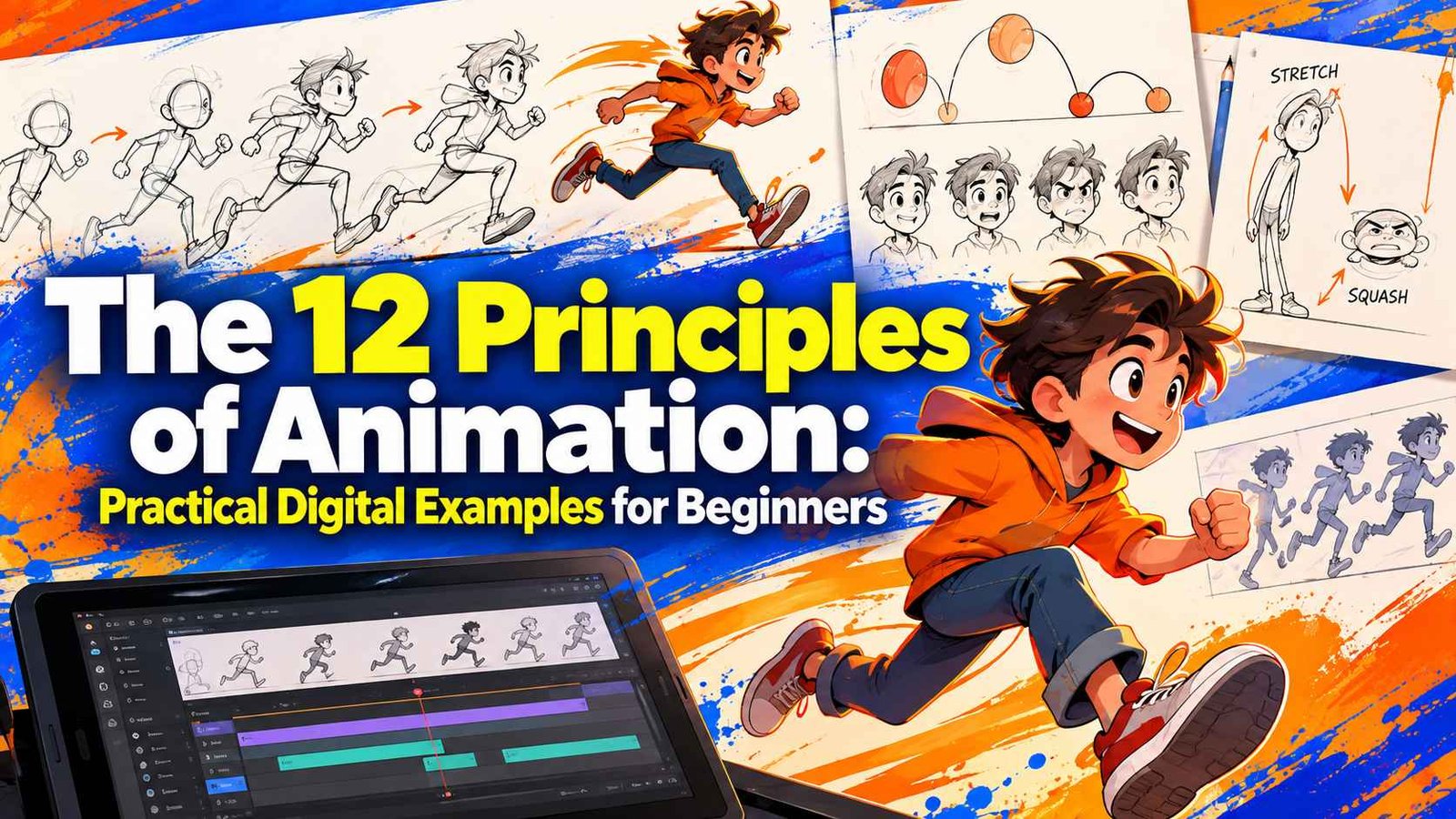
Making an object move across a computer screen takes seconds, but giving that object weight, intention, and life requires deliberate craft. Many beginners get caught up in keyframing software without realizing why their character walks feel robotic or their UI motions feel jarring. Disney legends Ollie Johnston and Frank Thomas introduced the 12 principles of animation in their 1981 book The Illusion of Life, setting down rules that still define visual storytelling today.
Whether you animate 2D vectors in After Effects, sketch frame-by-frame loops on an iPad, or rig 3D meshes in Blender, these timeless rules keep your work believable. Understanding how to translate traditional pencil-and-paper theory into digital workflows transforms mechanical motion into compelling character performances.
Why the 12 Principles of Animation Matter in Digital Workflows
Modern animation suites automate interpolation through math curves, yet automation often produces lifeless easing. Software creates linear movement by default, moving pixels rigidly from point A to point B. Applying the 12 principles of animation injects physics, anatomy, and personality into cold digital paths.
Studying movement fundamentals also accelerates your mastery of commercial tools. If you are exploring the best Domestika After Effects courses, you will discover that keyframe graphs make far more sense once you grasp physical inertia. Broadening your technical range through a comprehensive graphic design, video editing, and motion graphics masterclass similarly helps you bridge the gap between static asset design and dynamic, living motion graphics.
The 12 Principles Explained with Practical Digital Examples
1. Squash and Stretch
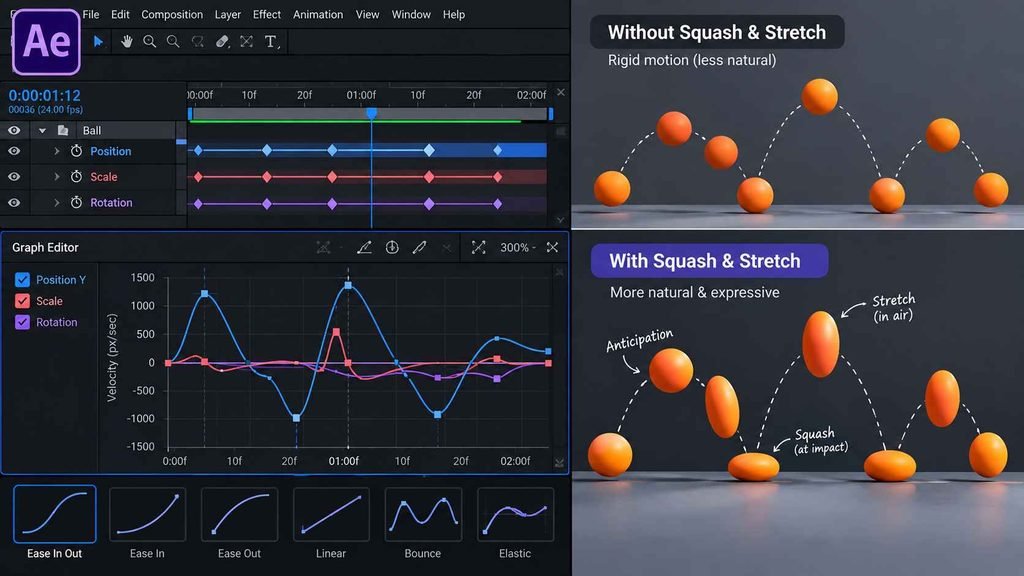
Squash and stretch conveys flexibility, mass, and velocity. When a rubber ball drops, it elongates as it falls and flattens upon ground impact while maintaining its total volume. In digital applications like After Effects or Blender, never scale one axis without compensating on the other; scaling an object to 120% height requires reducing its width to roughly 80% to keep mass consistent.
2. Anticipation
Anticipation prepares the audience for an action that is about to happen. Before a character leaps forward, they crouch low and gather energy in their legs. In UI and motion design, a digital button might slightly contract or pulse inward right before triggering a full-screen transition.
3. Staging
Staging directs the viewer’s eye to the most critical action in the frame. Clear silhouettes, intentional lighting, and focused camera angles prevent visual confusion. If an animated character raises an important item, keeping the background uncluttered and staging the gesture in open space ensures immediate readability.
4. Straight Ahead Action and Pose to Pose
These two methods represent differing production workflows. Straight Ahead animates frame by frame sequentially from start to finish, which works well for fluid elements like water, smoke, and fire. Pose to Pose plots key storytelling extremes first, filling in breakdowns and in-betweens later to give animators precise control over proportions and timing.
5. Follow Through and Overlapping Action
Nothing stops all at once. Follow through occurs when loose parts, such as long hair, capes, or tails, continue traveling forward after a character halts. Overlapping action means separate body parts move at different rates; an arm drops first, followed moments later by the wrist and fingertips settling into rest.
6. Slow In and Slow Out (Ease In / Ease Out)
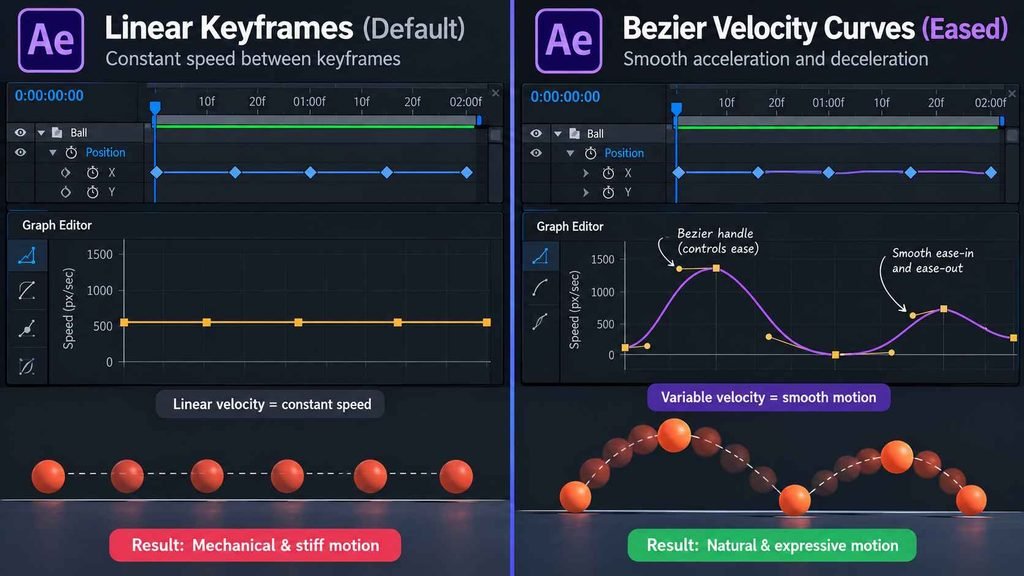
Physical objects take time to accelerate and decelerate. Rather than moving at a constant, robotic speed, movements start gradually, hit peak velocity mid-action, and slow before stopping. In digital software, opening your timeline’s Graph Editor and converting linear keyframes into Bezier handles applies natural ease-in and ease-out curves.
7. Arcs
Natural motion follows curved trajectories rather than straight, robotic lines. A human hand gestures in an arc swinging from the shoulder and elbow joints. Plotting spatial keyframes along curved motion paths prevents characters and flying camera transitions from feeling stiff and mechanical.
8. Secondary Action
Secondary actions enrich primary movements without distracting from them. If a character walks angrily down a hallway (the primary action), stomping their feet, clenching their fists, or swinging an umbrella adds emotional dimension (the secondary action). Secondary details enhance the storytelling without stealing the focus.
9. Timing
Timing refers to the number of frames assigned to an action. More frames produce slower, floatier motion, while fewer frames indicate speed, crispness, and punch. Moving an arm across the screen over 24 frames looks gentle and deliberate, while covering the same distance in 3 frames delivers an aggressive strike.
10. Exaggeration
Exaggeration pushes reality to evoke emotional impact and kinetic humor. True-to-life motion often registers as dull or imperceptible on screen. Pushing an extreme facial expression slightly past physical anatomy or amplifying an impact bounce gives the scene dramatic energy.
11. Solid Drawing
Solid drawing requires understanding 3D space, volume, weight, and perspective on a 2D surface. Animators avoid flat, symmetrical “twinning” poses where arms and legs mirror each other identically. Maintaining consistent mass as a character rotates through space keeps the figure grounded.
12. Appeal
Appeal gives an animated design charisma, charm, and presence. Just as charismatic actors captivate live-action audiences, appealing animated figures feature pleasing shape language, distinct silhouettes, and relatable personalities. Even menacing villains require strong visual clarity and engaging dynamics.
The 12 Principles of Animation: Digital Implementation Matrix
| Principle | Primary Function | Digital Tool / Technique | Common Beginner Mistake |
| Squash & Stretch | Shows weight & flexibility | Scale properties (Link Proportions off) | Changing total volume |
| Anticipation | Prepares viewer for action | Reverse-direction setup keyframes | Skipping prep movement |
| Staging | Clarifies visual focus | Camera focal lengths & composition | Overcrowding the active frame |
| Straight Ahead / Pose to Pose | Dictates workflow structure | Frame-by-frame vs. Keyframing | Inconsistent character volume |
| Follow Through & Overlap | Reflects drag & inertia | Parenting chains & delayed keyframes | Everything stopping simultaneously |
| Slow In & Slow Out | Controls acceleration | Graph Editor Bezier curves | Relying on flat linear interpolation |
| Arcs | Ensures natural motion paths | Spatial interpolation curve paths | Moving objects in straight zigzags |
| Secondary Action | Adds emotional depth | Subsidiary layer keyframing | Overpowering the main action |
| Timing | Establishes weight & pacing | Keyframe spacing on timeline | Evenly spaced, lifeless timing |
| Exaggeration | Amplifies comedic/dramatic effect | Pushed extreme poses | Making movement unreadable |
| Solid Drawing | Preserves 3D volume | 3D guides & anatomical volume passes | Flat, stiff character turnarounds |
| Appeal | Captivates audience attention | Expressive silhouettes & shape contrast | Bland, symmetrical posing |
Frequently Asked Questions
Which principle of animation is the most important for beginners?
Squash and stretch alongside slow in and slow out form the core bedrock for beginners. Mastering how mass deforms on impact and how speed ramps across a digital graph editor immediately fixes rigid, robotic motion.
Do 3D animators and motion designers need these principles?
Yes. Modern 3D rigging and motion graphics rely heavily on easing, follow through, and anticipation. While 3D software handles camera perspective and lighting automatically, animators still manually craft timing, arcs, and personality across every keyframe.
Where can I practice these principles with guided projects?
Practicing structured exercises inside dedicated curricula simplifies the learning curve. Exploring curated courses among the best Domestika motion graphics courses connects you with working studio animators who demonstrate these principles using modern creative suites.
Mastering Animation Fundamentals
Mastering movement takes systematic observation and daily practice on the timeline. Rather than attempting a complex character fight scene right away, begin by animating a bouncing ball across different weights: rubber, bowling ball, and balloon.
Once you train your eye to spot mechanical stiffness, linear keyframes will no longer satisfy your standards. Open your software of choice, sketch out your key poses, and start breathing life into your digital frames today.