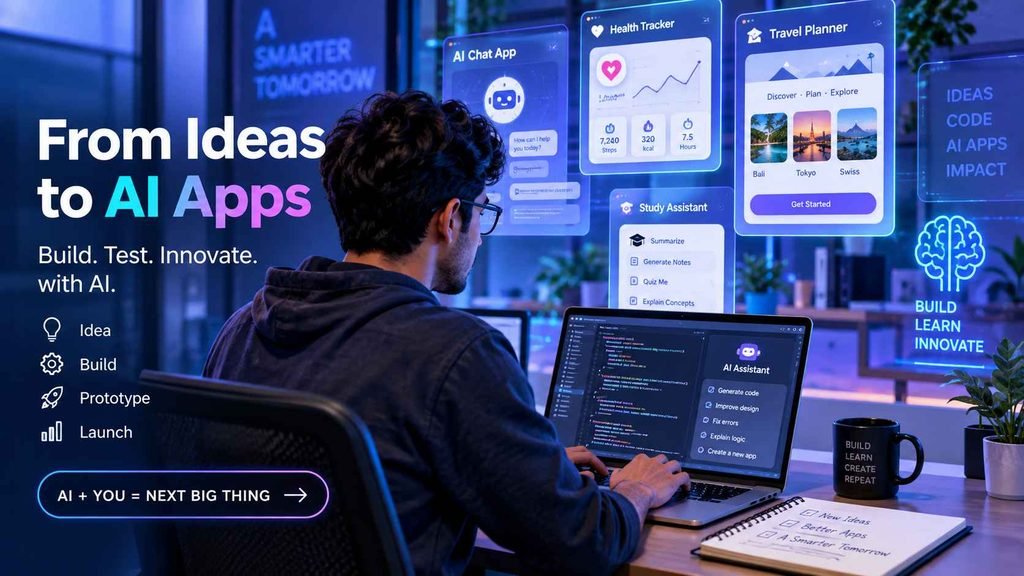
Artificial intelligence is changing how software gets built. Instead of writing every line of code manually, developers, designers, entrepreneurs, and even non-programmers can now describe an idea in plain English and let AI generate working prototypes within minutes. This new workflow is widely known as Vibe Coding.
edX’s Vibe Coding: Rapid Prototyping with AI is a short, self-paced certification course that teaches beginners how to build AI-powered applications and prototypes using prompt engineering and generative AI tools. Rather than focusing on traditional programming, the course introduces a modern workflow where AI becomes your coding partner.
In this detailed CoursioBucket review, we’ll cover the course syllabus, skills you’ll learn, certificate value, pricing, pros and cons, and whether it’s worth taking in 2026.
- Quick Verdict
- What is edX Vibe Coding: Rapid Prototyping with AI?
- Course Overview
- What You’ll Learn
- Course Curriculum Breakdown
- Module 1 — Introduction to Vibe Coding
- Module 2 — Prompt Engineering for Coding
- Module 3 — Building AI Prototypes
- Module 4 — Improving AI-Generated Applications
- Module 5 — Responsible AI Development
- Skills You Will Gain
- Why Vibe Coding Matters in 2026
- Hands-On Learning Experience
- AI Tools You’ll Become Familiar With
- Who Should Take This Course?
- Do You Need Programming Experience?
- Projects You Can Build After Completing This Course
- What Makes This Course Different?
- Pros and Cons
- Pros
- Cons
- Is the edX Certificate Worth It?
- Career Opportunities After This Course
- edX Vibe Coding vs Coursera AI for Vibe Coding
- Who Should Skip This Course?
- Tips to Get Maximum Value from This Course
- Frequently Asked Questions (FAQs)
- Is edX Vibe Coding: Rapid Prototyping with AI free?
- Is this course suitable for complete beginners?
- How long does the course take to complete?
- Do I need coding experience?
- Can I add the certificate to LinkedIn?
- Final Verdict
Quick Verdict
| Course Name | Vibe Coding: Rapid Prototyping with AI |
| Platform | edX |
| Category | AI Certification Course |
| Level | Beginner to Intermediate |
| Duration | 4–8 Hours (Self-paced) |
| Certificate | Verified Certificate Available |
| Free Audit | Yes |
| Best For | Students, Designers, Product Managers, Entrepreneurs, Beginners |
| Overall Rating | ⭐⭐⭐⭐⭐ 4.7/5 |
Bottom Line: If you want to learn AI-assisted app building without becoming a software engineer, this is one of the best beginner-friendly AI prototyping courses available on edX.
What is edX Vibe Coding: Rapid Prototyping with AI?
Vibe Coding: Rapid Prototyping with AI is an online AI certification course offered through edX. It teaches learners how to create functional software prototypes using natural language prompts instead of writing everything manually.
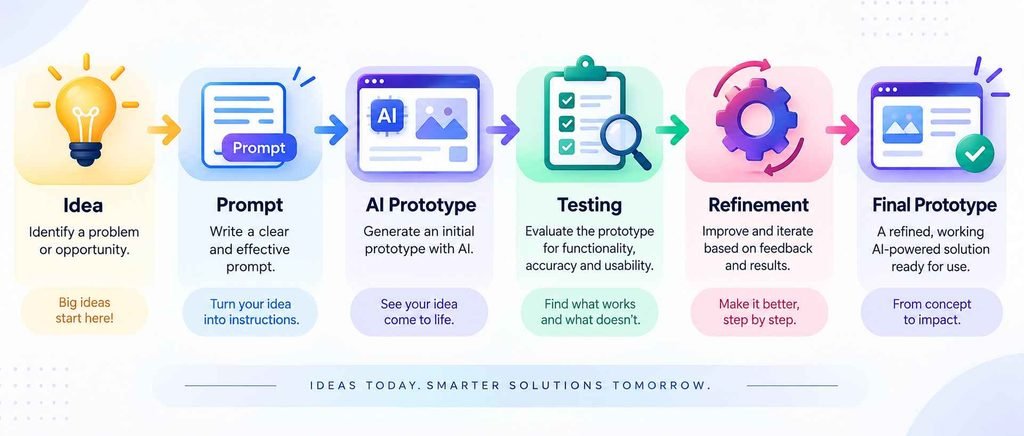
The course introduces an AI-first development workflow where you describe what you want to build, AI generates an initial version, and you iteratively improve it through prompt refinement, testing, and validation.
Instead of spending weeks creating a minimum viable product (MVP), learners discover how AI tools can build the first working version within minutes.
Course Overview
| Course Provider | edX |
| Learning Mode | 100% Online & Self-paced |
| Estimated Completion Time | Approximately 4–8 Hours |
| Language | English |
| Prerequisites | No mandatory coding experience required |
| Assessment | Quizzes and practical exercises |
| Certificate | Verified Certificate with Paid Upgrade |
What You’ll Learn
- Understand the concept of Vibe Coding and AI-assisted software development.
- Build working prototypes using generative AI tools.
- Learn prompt engineering techniques for better AI-generated code.
- Iterate and improve AI-generated applications.
- Test and validate prototypes before sharing them.
- Document AI-generated workflows.
- Follow responsible and ethical AI development practices.
Course Curriculum Breakdown
Module 1 — Introduction to Vibe Coding
- What is rapid prototyping?
- Introduction to Generative AI.
- AI-assisted coding workflow.
- Benefits and limitations of AI-generated code.
Module 2 — Prompt Engineering for Coding
- Writing effective prompts.
- Context engineering.
- Prompt refinement strategies.
- Zero-shot vs iterative prompting.
- Generating more accurate code outputs.
Module 3 — Building AI Prototypes
- Creating prototype environments.
- Testing AI-generated applications.
- Debugging AI outputs.
- Managing prototype versions.
Module 4 — Improving AI-Generated Applications
- Reviewing generated interfaces.
- Matching business requirements.
- Improving user experience.
- Prototype documentation.
Module 5 — Responsible AI Development
- Ethical AI practices.
- Human oversight.
- Verifying AI-generated code.
- Responsible deployment principles.
Skills You Will Gain
| Skill | Practical Use |
|---|---|
| Prompt Engineering | Generate better code and UI from AI prompts. |
| Rapid Prototyping | Create MVPs quickly. |
| AI-Assisted Coding | Collaborate with AI coding assistants. |
| Prototype Testing | Validate AI-generated applications. |
| Debugging | Improve AI-generated outputs through iteration. |
| Documentation | Track prompts and development improvements. |
Why Vibe Coding Matters in 2026
Vibe Coding has become one of the biggest trends in AI-powered software development. Rather than writing every line manually, developers communicate with AI using natural language prompts and refine generated applications.
| Traditional Coding | Vibe Coding |
|---|---|
| Manual syntax writing. | Natural language prompting. |
| Weeks to build MVPs. | Minutes to build prototypes. |
| Developer writes boilerplate code. | AI generates initial implementation. |
| Manual debugging. | AI-assisted debugging and refinement. |
| Programming-first workflow. | AI collaboration workflow. |
The course explains when AI-generated code is useful and why human review remains essential.
Hands-On Learning Experience
This isn’t just a video course. Learners complete practical exercises where they build and improve AI-generated prototypes.
- Create app ideas using prompts.
- Generate interfaces.
- Build workflows.
- Test functionality.
- Improve outputs using prompt iterations.
- Document prototype evolution.
AI Tools You’ll Become Familiar With
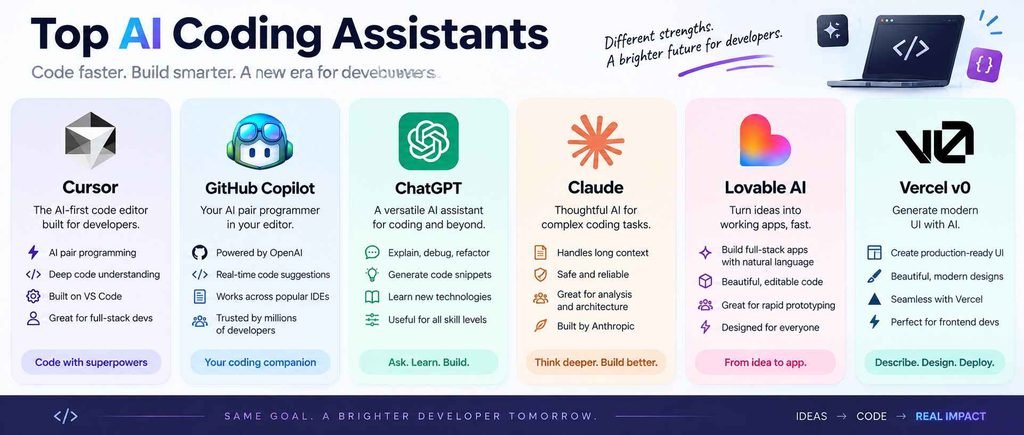
The course teaches transferable prompting concepts that work across many popular AI coding tools.
- Cursor AI
- GitHub Copilot
- ChatGPT
- Claude
- Lovable AI
- Vercel v0
- Bolt.new
Who Should Take This Course?
| Learner | Why This Course Fits |
|---|---|
| Students | Learn AI development without deep programming knowledge. |
| UX/UI Designers | Build interactive prototypes faster. |
| Entrepreneurs | Create MVPs before hiring developers. |
| Product Managers | Prototype workflows and product ideas. |
| Freelancers | Create quick client demos. |
| Researchers | Prototype dashboards, calculators, and forms. |
Do You Need Programming Experience?
No. The course is designed for beginners.
You don’t need prior knowledge of Python, JavaScript, or web development. Everything begins with describing your application idea using prompts.
However, learners with basic coding knowledge may better understand debugging and AI-generated code structure.
Projects You Can Build After Completing This Course
- Landing pages.
- Survey applications.
- AI-powered dashboards.
- Health calculators.
- Task management apps.
- Workflow automation tools.
- Startup MVPs.
- Educational web applications.
Image Prompt: Three AI-generated web application mockups: dashboard, survey app, and landing page.
What Makes This Course Different?
- Focuses on AI-first software creation.
- Teaches prompt engineering specifically for coding.
- Emphasizes rapid experimentation instead of traditional programming.
- Covers ethical AI development.
- Encourages documentation and iterative improvement.
Rather than replacing developers, the course teaches learners how to collaborate effectively with AI.
Pros and Cons
Pros
- Beginner-friendly.
- Short and practical.
- Self-paced learning.
- Free audit available.
- Covers prompt engineering.
- Useful for startup MVPs.
- Certificate available.
- Ethical AI practices included.
Cons
- Not a full programming course.
- Limited depth in software engineering concepts.
- Focuses on prototypes rather than production applications.
- Requires additional practice after completion.
Is the edX Certificate Worth It?
The verified certificate is useful for showcasing AI-related learning on LinkedIn, resumes, and portfolios.
While it won’t replace a software engineering degree, it demonstrates familiarity with AI-assisted product development and prompt engineering workflows.
Suggested Resume Entry
Vibe Coding: Rapid Prototyping with AI — edX (Verified Certificate)
Relevant skills include Prompt Engineering, Rapid Prototyping, AI-Assisted Coding, MVP Development, and Generative AI.
Career Opportunities After This Course
| Career Area | How This Course Helps |
|---|---|
| AI Product Manager | Prototype product ideas faster. |
| UX/UI Designer | Create interactive prototypes using AI. |
| Startup Founder | Build MVPs before hiring developers. |
| Automation Specialist | Create workflow automation prototypes. |
| AI Freelancer | Deliver client prototypes quickly. |
| No-Code Builder | Build internal tools with AI assistance. |
edX Vibe Coding vs Coursera AI for Vibe Coding
| Feature | edX Vibe Coding | Coursera AI for Vibe Coding |
|---|---|---|
| Level | Beginner–Intermediate | Beginner |
| Duration | 4–8 Hours | ~10 Hours |
| Focus | Rapid AI Prototyping | AI Coding Workflow |
| Prompt Engineering | Yes | Yes |
| Prototype Sandbox | Yes | Yes |
| Certificate | Verified Certificate | Shareable Certificate |
| Best For | Designers, Founders, PMs | General AI Builders |
Who Should Skip This Course?
This course may not be suitable if your goal is to learn:
- Python programming from scratch.
- Java or C++ development.
- Full-stack web development.
- Data structures and algorithms.
- Production-level software architecture.
It’s designed specifically for AI-assisted rapid prototyping.
Tips to Get Maximum Value from This Course
- Complete every practical prototype exercise.
- Maintain a notebook of effective prompts.
- Compare outputs from multiple AI coding assistants.
- Refine prototypes through several prompt iterations.
- Publish one finished project on GitHub or a portfolio website.
- Document what AI generated versus what you modified.
Frequently Asked Questions (FAQs)
Is edX Vibe Coding: Rapid Prototyping with AI free?
Yes. You can audit the course for free. A verified certificate requires a paid upgrade.
Is this course suitable for complete beginners?
Yes. The course is specifically designed for beginners and non-programmers interested in AI-assisted application development.
How long does the course take to complete?
Most learners finish the course within 4–8 hours, depending on practice time.
Do I need coding experience?
No prior programming knowledge is required, although basic coding knowledge can help with debugging AI-generated code.
Can I add the certificate to LinkedIn?
Yes. The verified edX certificate can be added to LinkedIn, resumes, and professional portfolios.
Final Verdict
If you’re interested in learning how AI can help build applications without writing everything manually, edX Vibe Coding: Rapid Prototyping with AI is one of the most practical beginner certification courses available in 2026.
It introduces prompt engineering, AI-assisted coding, rapid prototyping, testing, and responsible AI development in a concise, project-focused format.
For students, designers, entrepreneurs, product managers, freelancers, and researchers, this course provides an excellent starting point before moving into more advanced AI coding tools like Cursor, Claude Code, GitHub Copilot, Lovable AI, and Vercel v0.
CoursioBucket Rating: ⭐⭐⭐⭐⭐ 4.7/5