Creating fluid keyframe transitions, dynamic lower thirds, and cinematic title cards requires moving beyond default software presets. Beginners often battle rigid timing curves, messy composition hierarchies, and chaotic render queues when learning Adobe After Effects on their own. Enrolling in the best After Effects courses for motion graphics & title animation gives you a structured pipeline to master easing physics, type animators, expressions, and spatial design.
Whether your creative ambition involves designing broadcast title sequences, YouTube typography packages, or commercial brand animations, hands-on training saves months of frustrating guesswork. We evaluated curriculum depth, pacing, and project utility across top platforms to pinpoint the most effective courses available today.
Why Title Animation and Motion Design Demand Structured Training
After Effects is notorious for its steep learning curve. Novice animators frequently animate static text position by eye, resulting in robotic movement that lacks weight and organic momentum. Dedicated courses show you how to navigate the Graph Editor, manipulate value and speed graphs, and use the 12 principles of animation to make typographic layouts feel alive.
A disciplined visual foundation also accelerates your broader video workflow. If your projects involve editing narrative timelines alongside visual effects, learning through an Adobe Premiere Pro CC video editing course
provides an ideal complementary track. You learn how Dynamic Link seamlessly bridges Premiere cuts with complex After Effects compositions.
Furthermore, dynamic title design intersects closely with visual branding. If you want to develop an all-around design toolkit covering typography, visual hierarchy, and screen pacing, exploring a broader graphic design, video editing, and motion graphics masterclass
helps you tie motion techniques into complete commercial campaigns.
Top After Effects Courses for Motion Graphics & Title Animation
Best Motion Graphics Courses for After Effects Creators
1. Motion Beast (Motion Design School)
Motion Beast is an intensive, production-tested training ground. The curriculum starts with vector preparation and spatial transformation before advancing into secondary motion, liquid animation, and character rigging. Its typography modules stand out for teaching bespoke lettering reveals using stroke trims, track mattes, and shape layer morphing.
2. After Effects Kickstart by Nol Honig (School of Motion)
School of Motion’s flagship beginner bootcamp approaches After Effects with studio discipline. Nol Honig demystifies layer parenting, null objects, shape modifiers, and 3D camera staging. Because every assignment receives critique from professional teaching assistants, you develop clean project hygiene and avoid sloppy composition nesting habits early on.
3. Kinetic Typography: Create a Visual Concept in Motion (Domestika)
This project-focused course focuses specifically on expressive typography, title animation, and rhythm. The instructor demonstrates how to pair voiceover cadences with kinetic type layouts using text animators, range selectors, and wiggle expressions. Exploring targeted programs among the best Domestika motion graphics courses makes building portfolio-ready title sequences both accessible and budget-friendly.
4. After Effects CC: Complete Motion Graphics & Title Design (Udemy)
For creators wanting practical commercial templates, this comprehensive course covers title sequences, kinetic lower thirds, and logo reveals from scratch. You learn to write basic JavaScript expressions like loopOut(), time, and linear() to automate repetitive motion without placing hundreds of manual keyframes.
Comparing the Top Motion Graphics & Title Animation Courses
| Course Platform & Name | Primary Focus | Best For | Core Skills Covered | Primary Deliverable |
| Motion Design School (Motion Beast) | Modern Commercial Motion | Intermediate | Shape morphing, easing physics, mattes | High-energy motion showreel |
| School of Motion (AE Kickstart) | Software Foundations & Mechanics | Beginners | Graph editor, 3D cameras, parenting | Multi-scene broadcast package |
| Domestika (Kinetic Typography) | Title Design & Text Rhythm | Beginner–Intermediate | Range selectors, tracking, expressions | Kinetic audio-synced title sequence |
| Udemy (Complete AE Title Design) | Template & Asset Production | All Levels | Lower thirds, logo stings, render queues | Commercial motion graphics asset pack |
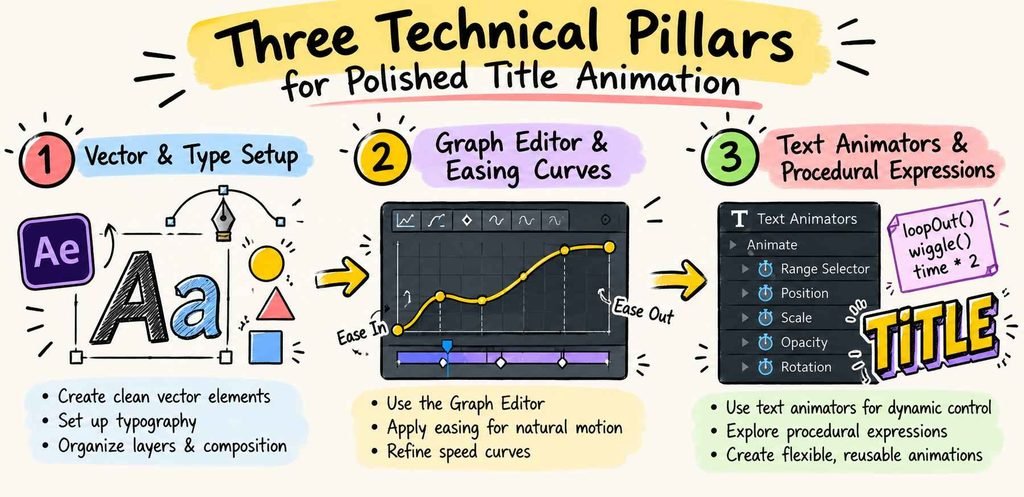
Three Technical Pillars for Polished Title Animation
1. Graph Editor Mastery
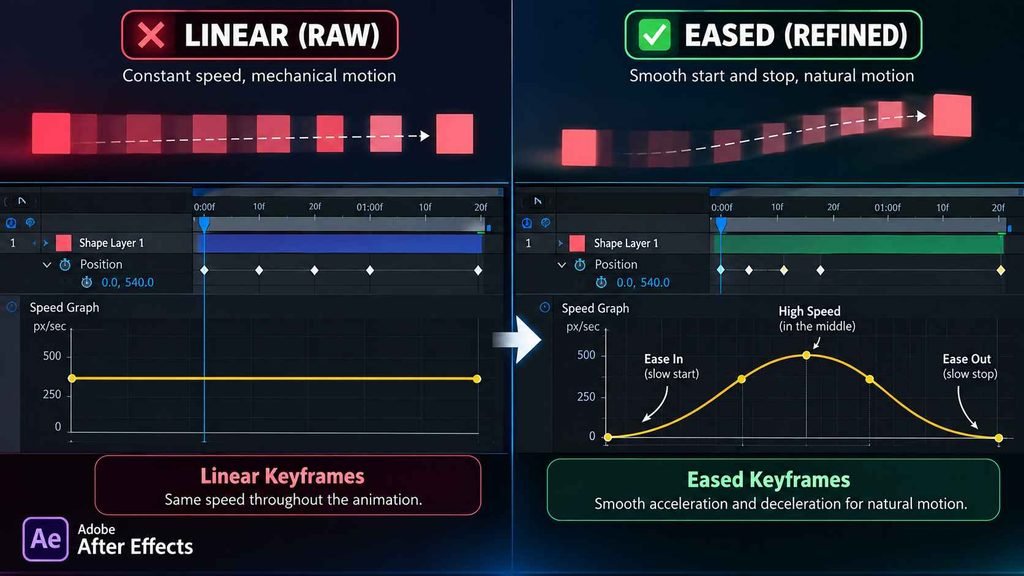
Linear keyframes create mechanical, unnatural motion. The human eye expects objects to accelerate, coast, and decelerate. Mastering bezier handles inside the Speed and Value graphs lets you inject anticipation and overshoot into your titles. Professional animators rely on exponential ease curves to make simple text slides feel snappy and premium.
2. Built-In Text Animators vs. Transform Properties
Beginners often animate text by adjusting the layer’s global Transform properties, which moves the entire sentence as one rigid block. Using native After Effects Text Animators unlocks range and wiggly selectors. This lets you stagger rotation, tracking, opacity, and blur on a per-character or per-word basis without breaking text into separate layers.
3. Lightweight Procedural Expressions
Hardcoding keyframes for every title element bloats project timelines and complicates client revisions. Utilizing simple expressions like wiggle(2, 15) or valueAtTime() introduces procedural secondary motion and effortless trailing offsets. Setting up slider controls connected to expressions allows you to adjust entire typography systems from a single master control null.
Frequently Asked Questions
Do I need graphic design experience before learning After Effects?
While knowing basic typography rules and color balance helps, it is not mandatory. Most foundational courses walk you through composition layout and framing before diving into motion timing and keyframing mechanics.
Can my laptop run After Effects smoothly for title animation?
Title animation and 2D motion graphics require significantly fewer resources than heavy 3D rendering or 4K live-action VFX compositing. A modern computer equipped with at least 16GB of RAM (32GB recommended for complex timelines) and a dedicated GPU handles motion graphics reliably.
What is the difference between kinetic typography and motion graphics?
Motion graphics is a broad discipline encompassing animated vector art, broadcast branding, character movement, and UI demonstrations. Kinetic typography is a specialized sub-branch of motion graphics dedicated entirely to animating expressive, readable text to convey emotion, tone, or spoken dialogue.
Turning static layouts into fluid, high-impact titles requires deliberate practice with timing curves and composition structure. Choosing the right training path provides the techniques and project portfolio needed to attract high-paying commercial clients or build your own broadcast assets. Select a course matching your current skill level, boot up After Effects, and bring your motion designs to life today.