
3D motion graphics have become one of the most in-demand creative skills across advertising, YouTube, social media, product design, UI animation, and visual effects. From Apple’s product launches to Nike commercials and Netflix title sequences, many of today’s eye-catching visuals are created using Cinema 4D, Blender, Maya, and After Effects.
If you’re a complete beginner looking for a structured course worth paying for, this guide compares the best online options based on software, learning style, career goals, and value for money.
Why Learn 3D Motion Graphics in 2026?
3D motion graphics combine graphic design, animation, and visual storytelling into dynamic visual content used across digital platforms. Businesses, startups, creators, and agencies increasingly rely on 3D animation for marketing campaigns, product launches, explainer videos, and social media advertising.
Learning 3D motion graphics can help you pursue careers such as:
- Motion Graphics Designer
- 3D Animator
- Product Visualization Artist
- Freelance Motion Designer
- VFX Artist
- Creative Content Creator
- Advertising Designer
Even if you’re already a graphic designer or video editor, adding 3D skills can significantly expand your creative opportunities.
What You’ll Learn in a Beginner 3D Motion Graphics Course
A good beginner course should teach the complete production pipeline rather than isolated tutorials.
The following courses cover these fundamentals while helping you build portfolio-worthy projects.
Best Online Courses to Learn 3D Motion Graphics from Scratch
1. Cinema 4D Basecamp by School of Motion

Best for: Complete beginners who want industry-standard commercial workflows.
Cinema 4D Basecamp is one of the most popular premium beginner courses for aspiring motion designers. It starts with the fundamentals of Cinema 4D before gradually introducing lighting, texturing, animation, and the powerful MoGraph toolkit used extensively in advertising and broadcast design.
What you’ll learn
- Cinema 4D interface from scratch.
- Object modeling and scene creation.
- Materials and textures.
- Camera movement and lighting.
- MoGraph animation workflows.
- Dynamics and simulations.
- Rendering professional animations.
Why buy this course?
The course follows a structured curriculum with assignments and project-based learning, making it ideal for students who prefer a classroom-style experience instead of random tutorials.
Pros
- Excellent teaching quality.
- Industry-focused workflow.
- Portfolio-ready projects.
- Beginner-friendly structure.
Cons
- Premium pricing.
- Requires dedicated study time.
2. 3D Motion Beast by Motion Design School


Best for: Beginners who want a complete 3D production pipeline.
3D Motion Beast teaches much more than animation. It covers the entire creative workflow, from planning concepts to creating polished commercial animations.
What you’ll learn
- Storyboarding.
- Asset modeling.
- Rigging.
- Physics simulations.
- Camera animation.
- Rendering.
- Adobe After Effects compositing.
- Color grading.
Why buy this course?
This course is designed around real commercial projects, helping students understand how professional studios produce animations from start to finish.
Pros
- Comprehensive workflow.
- Strong simulation training.
- Lifetime access.
- Commercial-style projects.
Cons
- Slightly steeper learning curve.
- Requires After Effects for compositing lessons.
3. Modern Motion Vol. 1 by Motion Design School


Best for: Designers who want to learn Blender and After Effects together.
Modern Motion Vol. 1 is an excellent choice if you want to avoid expensive software subscriptions. The course teaches Blender for 3D creation and After Effects for finishing motion graphics.
What you’ll learn
- Blender basics.
- Modeling and animation.
- Cameras and lighting.
- Rendering.
- Export workflow.
- After Effects integration.
- Motion graphics compositing.
Why buy this course?
The combination of Blender and After Effects is popular among freelancers, YouTubers, startups, and digital creators who need affordable professional tools.
Pros
- Uses free Blender software.
- Modern visual style.
- Practical commercial projects.
- Great value for beginners.
Cons
- Less focus on advanced simulations.
- Requires learning two applications.
4. Maya for Beginners: Complete Guide to 3D Animation by Udemy

Best for: Budget-conscious learners interested in film, gaming, and VFX.
Autodesk Maya is widely used in animation studios, gaming companies, and visual effects production. This beginner course introduces the software through hands-on projects without assuming previous experience.
What you’ll learn
- Polygon modeling.
- UV mapping.
- Materials and textures.
- Lighting setup.
- Character animation basics.
- Cloth and smoke simulations.
- Water effects.
- Rendering workflows.
Why buy this course?
This is one of the most affordable ways to learn Autodesk Maya, especially during Udemy sales.
Pros
- Comprehensive curriculum.
- Affordable pricing.
- Covers simulations and rendering.
- Self-paced learning.
Cons
- Complex interface for beginners.
- Limited personalized support.
Course Comparison
Which Software Should Beginners Learn First?
The best software depends on your career goals.
If you’re completely new to 3D, Blender is the easiest budget-friendly starting point, while Cinema 4D is often the preferred choice for commercial motion graphics.
What Projects Will You Build?
Most beginner-friendly courses include practical portfolio projects such as:
- Animated product advertisements.
- 3D logo reveals.
- Typography animations.
- Social media promotional videos.
- Abstract looping animations.
- UI motion graphics.
- Product visualization scenes.
- Commercial-style short animations.
These projects can be showcased on Behance, Instagram, LinkedIn, or freelance marketplaces.
How Long Does It Take to Learn 3D Motion Graphics?
With consistent daily practice, most beginners can build a solid foundation within two to three months.
Spending one to two hours each day is enough to complete most beginner courses within this timeframe.
Tips Before Buying a 3D Motion Graphics Course
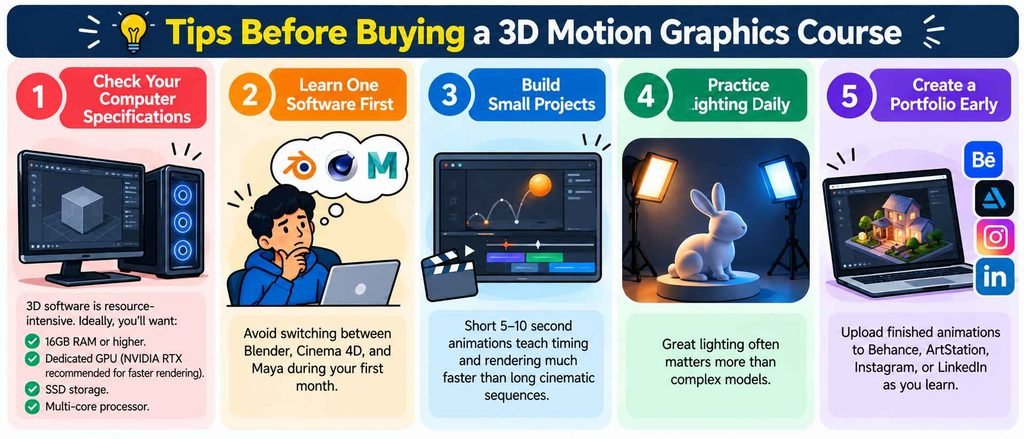
Choosing the right course is easier when you keep these points in mind.
Check Your Computer Hardware
3D animation software benefits from:
- 16GB RAM or higher.
- Dedicated graphics card.
- SSD storage.
- Multi-core processor.
Focus on One Software First
Avoid learning multiple 3D applications simultaneously. Master one workflow before exploring others.
Build Short Animations
Create 5–10 second animations instead of long projects. Short renders help you practice faster and reduce rendering time.
Practice Lighting Every Day
Strong lighting dramatically improves the quality of beginner animations, even with simple models.
Start Building a Portfolio Early
Publish finished projects on Behance, ArtStation, Instagram, or LinkedIn while learning. A small portfolio is more valuable than dozens of unfinished tutorials.
Frequently Asked Questions
Can I learn 3D motion graphics without any design experience?
Yes. All of the courses listed are designed for beginners and teach the fundamentals before moving into advanced animation techniques.
Is Blender enough for freelance motion graphics work?
Yes. Blender is widely used for product visualization, social media animations, YouTube content, and freelance commercial projects.
Should I learn After Effects along with Blender or Cinema 4D?
If your goal is motion graphics, learning After Effects is highly recommended because it is commonly used for compositing, typography animation, color grading, and final video editing.
Which course offers the best value for money?
Cinema 4D Basecamp is a strong premium choice for commercial motion graphics, while Maya for Beginners on Udemy is one of the most affordable options. Modern Motion Vol. 1 is an excellent value if you want to build skills using Blender and After Effects.
Final Thoughts
Learning 3D motion graphics is one of the fastest ways to expand your creative skill set in 2026. Whether you’re creating product advertisements, YouTube intros, animated logos, or cinematic social media content, mastering modeling, lighting, animation, and rendering opens opportunities across multiple industries.
If you’re starting completely from scratch, choose one software, complete one structured beginner course, and spend time building short portfolio projects alongside the lessons. Consistent practice matters far more than trying to learn every 3D application at once.
A strong portfolio of polished 10-second animations can often demonstrate your skills better than dozens of unfinished tutorials, making these beginner courses a worthwhile investment for aspiring motion designers and freelancers.
